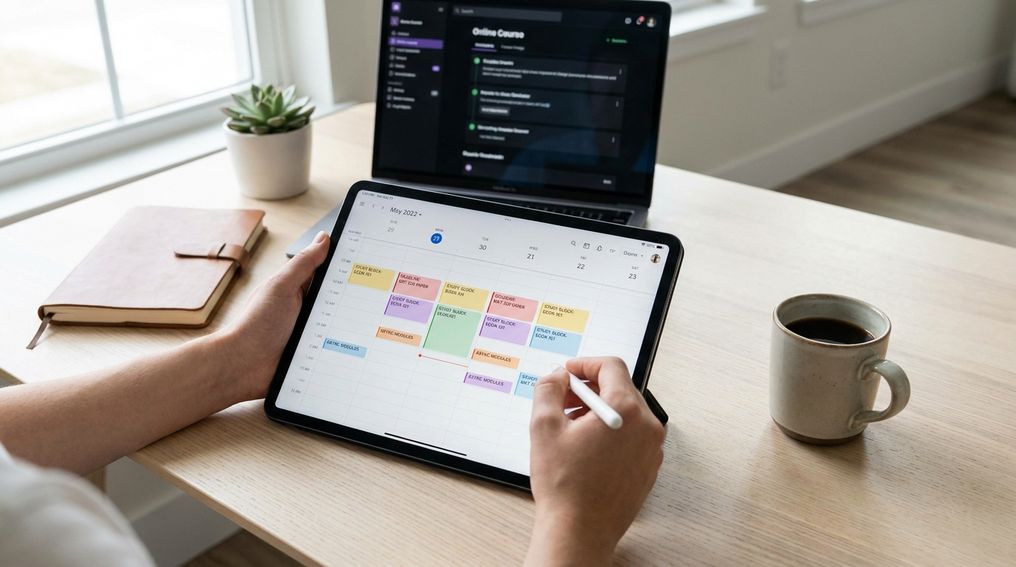
An effective asynchronous course routine replaces missing class meetings with fixed weekly study blocks, early personal deadlines, and a short review ritual. You succeed by giving each course a predictable place in your calendar before the week gets crowded.
Asynchronous courses give you freedom, but freedom can turn into Sunday-night panic when readings, videos, discussion posts, quizzes, and assignments all land at once. This guide shows you how to build a weekly study schedule for online classes that fits around work, family, and other commitments without relying on last-minute motivation. You’ll learn how to map your week, convert each syllabus into tasks, study actively, and adjust your plan before you fall behind.
Why Asynchronous Courses Need A Different Kind Of Routine
An asynchronous course usually lets you access materials and complete coursework on your own schedule within weekly or module-based deadlines. That flexibility is useful, especially if you work, commute, care for family, or study across time zones. It also removes the built-in structure that a live class gives you. No one is making you show up at 10 a.m. on Tuesday, so your calendar has to do that job.
The main risk is not laziness. It’s invisible workload. A recorded lecture may look like a one-hour task, but the real work includes pausing, taking notes, checking the reading, posting in a discussion board, preparing an assignment, and reviewing feedback. If you don’t assign time to those pieces, they merge into one vague task called “do class,” which is easy to postpone.
A strong asynchronous course routine gives your week a backbone. You don’t need a perfect schedule, and you don’t need to study every day at the same minute. You need repeatable blocks, a task list you trust, and a habit of checking the course before deadlines get close. Once that rhythm exists, the course feels less like a pile of alerts and more like a normal part of your week.
Step 1: Map Your Fixed Study Blocks For The Week
Start by treating study time like an appointment, not a leftover activity. Put your work hours, commute, meals, sleep, family duties, and non-negotiable commitments into your calendar first. Then add fixed study blocks for each asynchronous class. If a block is not on the calendar, it will probably compete with everything else that feels urgent.
A common college planning guideline is to expect several hours of work each week for each course, with time varying by credit load, course level, and assignment type. For a typical three-credit course, many students should plan for roughly six to nine hours across the week, then adjust after seeing the real workload. That does not mean one huge block has to carry the full course. Shorter blocks often work better because they reduce fatigue and give your brain time to process material.
Build your first version with two or three fixed sessions per course. One session can focus on intake, readings, lecture videos, and notes. Another can handle discussion posts, practice problems, or drafting. A third can be reserved for revision, submission, and review. If your week is crowded, protect smaller blocks with clear labels: “Biology reading,” “History discussion post,” or “Statistics problem set,” not a vague label like “school.”
Step 2: Turn Each Course Syllabus Into A Concrete Weekly Task List
Your syllabus is not just a document to read once at the start of the term. It is the raw material for your weekly task list. Open the syllabus, learning management system, course calendar, and announcement area, then write down every recurring task. Include readings, lecture videos, quizzes, discussion posts, replies, labs, papers, exams, group work, and office hour options.
Break large assignments into visible pieces. “Write essay” is too broad for a busy week. A better task list says: review prompt, choose topic, collect sources, outline, draft, revise, proofread, submit. The same rule applies to recorded lectures. “Watch module” becomes: watch part one, take notes, pause for practice questions, summarize main ideas, post one question for clarification.
Once the tasks are visible, assign them to your study blocks. Put heavier thinking work into your stronger hours when possible. If mornings are better for concentration, use them for readings, writing, math, coding, or problem-solving. Use lower-energy times for organizing notes, checking announcements, formatting submissions, or reviewing instructor feedback. Your asynchronous course routine should match your real energy, not an ideal version of your day.
Step 3: Schedule Active Learning, Not Just Watching Videos
Watching lectures is only the intake stage. It can feel productive because the course content is moving, but understanding often stays shallow until you retrieve, explain, apply, or test the material. Active learning means you do something with the content after you receive it. That can include writing a short summary, answering practice questions, solving problems without notes, teaching the concept aloud, or comparing two ideas from the module.
Build active learning into the same block as the lecture whenever possible. After a twenty-minute video segment, pause and write three bullet points from memory. After a reading, close the page and explain the main claim, method, or process in your own words. After a problem demonstration, solve a similar problem before moving on. These actions make gaps visible early, when you still have time to fix them.
For courses with discussion boards, don’t treat posts as separate busywork. Use them as a study tool. Draft your first post from your notes, then use replies to test whether you can connect your idea to another student’s argument, a reading, or a course concept. If your course includes quizzes, treat each quiz as feedback about what to review, not just a grade event.
Step 4: Set Personal Deadlines Before Official Due Dates
Official deadlines are the last safe moment, not the best planning target. Set your personal deadline one or two days early for major assignments, discussion posts, quizzes, and projects. That buffer protects you from tech problems, surprise work shifts, family interruptions, unclear instructions, and the simple fact that some assignments take longer than expected.
This is especially helpful when several asynchronous courses use the same weekly deadline. Many online classes organize modules around a repeated due day, often near the end of the week. If you wait until that day, every course feels urgent at once. Move your own due dates earlier so the week has stages: intake early, drafting or practice midweek, submission before the official deadline.
Use two calendar layers if that helps. Keep the official deadline in one color and your personal deadline in another. The official date tells you the rule. Your personal date tells you the plan. When the personal deadline arrives, submit finished work when you can, or use the extra time for final checks instead of first attempts.
Step 5: Add One Accountability Anchor Each Week
Asynchronous learning can feel isolating because no live meeting forces contact with the instructor or classmates. Add one accountability anchor each week so the course does not exist only inside your own head. This can be a calendar reminder, a study partner check-in, an instructor question, a tutoring appointment, a discussion post goal, or a weekly progress message to someone who supports your education.
The anchor should be simple enough to repeat. A ten-minute Friday check-in with a classmate can work better than an ambitious study group that collapses after two meetings. If you don’t know anyone in the course, use the course tools already available: discussion boards, instructor messages, office hours, tutoring centers, or academic coaching services. The goal is to create a point of contact that nudges you to stay engaged.
Accountability also helps you catch confusion sooner. If you spend two study blocks stuck on the same concept, don’t wait until the deadline. Send a focused question: name the assignment, describe what you understand, and state exactly where you’re stuck. Instructors can respond more usefully when your question shows the work you’ve already done.
Step 6: Review And Adjust Your Routine Every Sunday
End each week with a short review. Fifteen minutes is enough. Open your calendar, course modules, gradebook, announcement page, and task list. Check what you completed, what rolled over, what took longer than expected, and what needs attention in the coming week.
Use the review to adjust, not criticize yourself. If your Monday night study block failed three weeks in a row, the block is probably poorly placed. Move it. If readings always take twice as long as expected, split them across two sessions. If discussion replies keep slipping, schedule them right after your first post instead of leaving them as a separate task.
This weekly reset is what keeps falling behind from snowballing. One missed video or late reading is manageable when you catch it quickly. Three missed modules become harder to repair. A steady Sunday review helps you see the next week before it starts, which gives your asynchronous course routine room to adapt.
Common Mistakes That Break An Asynchronous Routine
The first mistake is waiting for “free time.” Free time rarely appears in a clean, usable block. If you study only after every other demand has been handled, your course gets the weakest part of your day. Put study blocks on the calendar before the week fills up, then defend them the same way you would defend a work shift or appointment.
The second mistake is confusing access with progress. Logging into the course, opening a module, or playing a lecture is not the same as learning. You need a visible output from each session: notes, solved problems, a summary, a draft, flashcards, a submitted quiz, or a question for the instructor. If a study block ends with no output, decide what will change in the next one.
The third mistake is using too many tools. A digital calendar, one task list, and the learning management system are often enough. Adding several apps can create more maintenance than clarity. Choose tools you will actually check, then keep the system boring. Boring systems work because they reduce decisions.
Simple Tools And Templates To Keep Your Routine Running
Your tools should answer three questions: what is due, when will you work, and what is the next action. A digital calendar is best for time blocks and reminders. A task manager, notes app, spreadsheet, or paper planner can hold the weekly task list. Your learning management system remains the source for official instructions, announcements, grades, and submission links.
A simple weekly template can keep everything in one place. Create sections for each course, then list deadlines, readings, videos, assignments, questions, and study blocks. Add a small “status” label beside each task: not started, working, waiting, done. This gives you a quick view of the week without reopening every course page multiple times a day.
If you prefer a paper system, print one weekly planner and keep it near your study space. If you prefer digital tools, use calendar reminders for start times and personal deadlines. Don’t let the tool become the project. The tool exists to keep your online course time management visible, so you can spend more energy learning and less energy remembering.
What A Good Weekly Schedule Looks Like
A good schedule spreads the work across the week and separates intake, practice, production, and review. For one asynchronous course, Monday can be the course check-in and planning day. Tuesday or Wednesday can handle readings, lecture videos, and notes. Thursday can focus on discussion posts, problem sets, drafts, or practice. Friday or Saturday can be reserved for revisions, submissions, and a quick review.
If you take multiple asynchronous courses, avoid stacking every course into the same type of block. Don’t watch three lectures back-to-back and call the day done. Mix the work so your brain changes gears: read for one course, solve problems for another, then revise an assignment for a third. This makes the week less monotonous and gives every course a regular touchpoint.
Students with work or family duties can build the same rhythm with smaller sessions. A lunch break can handle announcement checks or discussion replies. A quiet evening block can handle drafting. A weekend morning can handle deeper reading or exam review. The format matters less than the repeatable pattern: check, learn, practice, produce, submit, review.
Weekly Routine For An Asynchronous Online Course
- Check deadlines every Monday
- Block 2–3 study sessions per course
- Set due dates 1–2 days early
- Review for 15 minutes weekly
Build A Routine You Can Actually Repeat
A successful asynchronous course routine is not a packed calendar or a color-coded plan that falls apart after one busy week. It is a repeatable rhythm that tells you when to check the course, when to learn the material, when to produce work, and when to review your progress. Start with fixed study blocks, turn the syllabus into concrete tasks, add active learning, and set personal deadlines before the official ones. Then review the plan weekly and adjust it based on real evidence from your own schedule. Once your course has a reliable place in your week, flexibility becomes an advantage instead of a trap.
References
- University Of North Carolina At Chapel Hill Learning Center: Time Management Inventory
- Harvard Extension School: Tips To Succeed As An Online Student
- Harvard Extension School: Setting Yourself Up For Success
- Harvard Extension School: How To Set Goals And Achieve Balance
- University Of Central Florida Online: Course Modalities
- Carnegie Mellon University Eberly Center: Retrieval Practice For Improved Learning
- The Learning Scientists: Optimising Learning Using Retrieval Practice
- Purdue Global: Study Tools For Online College Students.
Leave a Reply